CBS Reporting System - Coding Club Learning Guide
CBS Reporting System - Coding Club Learning Guide
Welcome to the Community-Based Surveillance (CBS) reporting system! This guide will help you understand, experience, and contribute to this public health surveillance platform.
Table of Contents
- What is CBS?
- System Overview
- Getting Started
- Learning Paths by Skill Level
- Hands-On Activities
- Contribution Areas
- Resources
What is CBS?
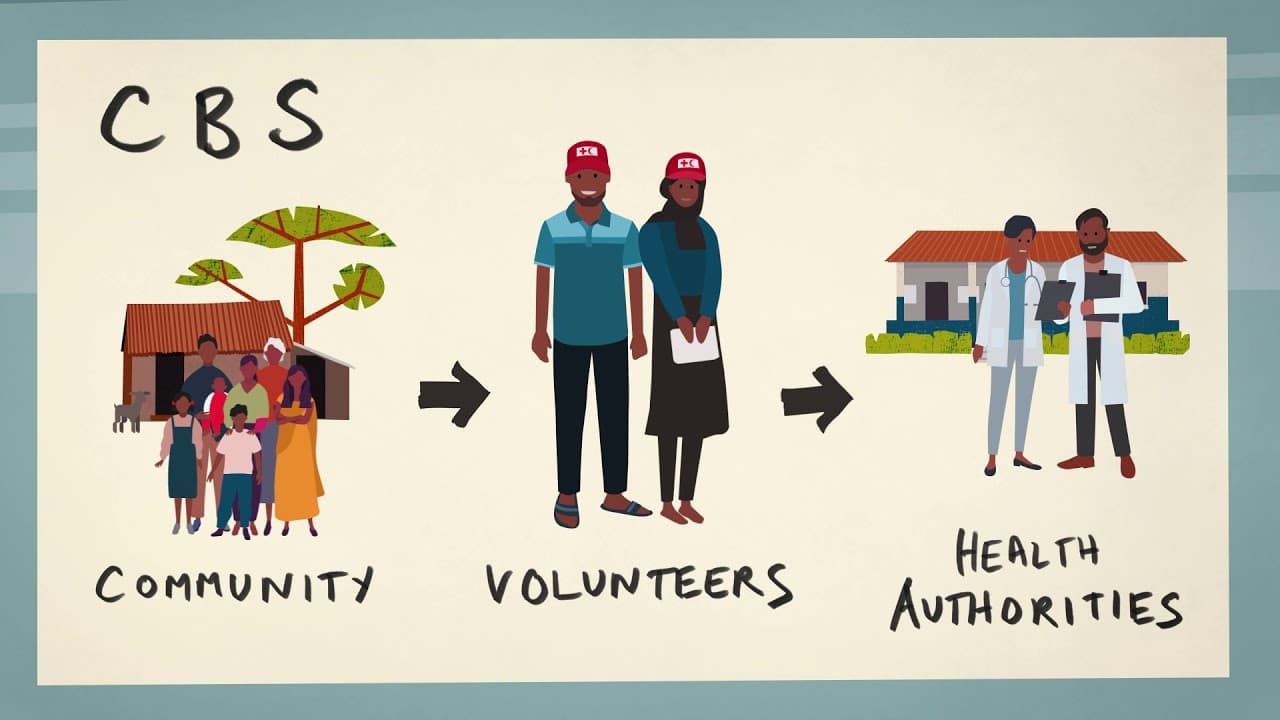
Community-Based Surveillance (CBS) is an early warning system for disease outbreaks and public health events. It empowers community members (volunteers, health workers) to report unusual health events quickly, enabling rapid response to potential epidemics.
Real-World Impact
- Early Detection: Catch disease outbreaks before they spread
- Community Empowerment: Enable volunteers to be first responders
- Data-Driven Decisions: Help health officials make informed decisions
- Mobile-First: Works in remote areas with limited internet
How It Works
- Community Volunteer notices unusual health event (e.g., sudden deaths, unusual symptoms)
- Reports via Mobile App or USSD (works on any phone)
- System Alerts Supervisors via SMS and dashboard
- Health Officials Respond based on severity and location
- Data Tracked for analysis and outbreak prevention
System Overview
Technology Stack
Frontend (Client)
- React.js - Modern web interface
- Tailwind CSS - Styling and design
- Shadcn/UI - Component library
- React Router - Navigation
- React Hot Toast - Notifications
Backend (Server)
- Node.js + Express - API server
- MongoDB - Database
- JWT - Authentication
- Africa's Talking - SMS notifications
- MinIO - Media storage (images/videos)
Mobile App
- Flutter - Cross-platform (Android/iOS)
- Dart - Programming language
- HTTP Client - API communication
- Local Notifications - Upload progress
USSD (No Internet Required)
- Text-based menu system
- Works on any phone
- SMS confirmations
Key Features
- Multi-Channel Reporting: Mobile app, web, USSD
- Hierarchical Access Control: Region-based permissions
- Real-Time Notifications: SMS alerts to relevant personnel
- Media Upload: Photos/videos with offline queue
- Escalation System: Auto-escalate based on severity
- Geographic Management: Multi-level regional hierarchy
- Role-Based Access: Custom permissions per project
Getting Started
Prerequisites Setup
Option 1: Basic Setup (Easiest)
For: Beginners, UI/UX designers, testers
# Required software
- Git (version control)
- Node.js v18+ (runtime)
- A code editor (VS Code recommended)
Option 2: Full Setup (Intermediate)
For: Backend developers, full-stack developers
# All from Option 1, plus:
- MongoDB (database)
- Postman (API testing)
Option 3: Complete Setup (Advanced)
For: DevOps, mobile developers, advanced contributors
# All from Option 2, plus:
- Flutter SDK (mobile development)
- MinIO (media storage)
- Docker (optional, for containers)
Installation Steps
1. Clone the Repository
git clone <repository-url>
cd cbsx
2. Install Dependencies
Backend:
cd server
npm install
Frontend:
cd ../client
npm install
Mobile App (if doing mobile development):
cd ../app
flutter pub get
3. Environment Setup
Backend (.env file):
cd server
cp .env.example .env
# Edit .env with your configuration
Required environment variables:
# Database
MONGODB_URI=mongodb://localhost:27017/cbs

# JWT Secret
JWT_SECRET=your-secret-key-here

# SMS (Africa's Talking)
SMS_USERNAME=your-username
SMS_API_KEY=your-api-key

# MinIO (Media Storage)
MINIO_ENDPOINT=localhost
MINIO_PORT=9000
MINIO_ACCESS_KEY=minioadmin
MINIO_SECRET_KEY=minioadmin
4. Start the Application
Backend:
cd server
npm run dev
Frontend:
cd client
npm run dev
Mobile App:
cd app
flutter run
Learning Paths by Skill Level
🟢 Beginner Path (No Prior Experience)
Week 1-2: Understanding the System
Activities:
Explore as a User (2 hours)
- Create an account on the web app
- Navigate through different sections
- Try submitting a test report
- Document your user experience
Learn CBS Concepts (3 hours)
- Read WHO CBS guidelines (provided in resources)
- Watch video on disease surveillance
- Write a summary: "Why CBS matters"
Understand the Workflow (2 hours)
- Map out the report submission flow
- Identify all user types (volunteer, supervisor, admin)
- Create a flowchart of the reporting process
Deliverable: User journey document with screenshots
Week 3-4: Basic Contributions
Activities:
UI/UX Testing (4 hours)
- Test the mobile app on Android/iOS
- Test the web interface on different browsers
- Document bugs, confusing elements
- Suggest improvements
Content Creation (3 hours)
- Write user guide for volunteers
- Create FAQ document
- Design infographics explaining CBS
Translation (if multilingual)
- Translate interface text to local language
- Review existing translations
Deliverable: Bug report + User documentation
🟡 Intermediate Path (Some Programming Experience)
Week 1: Frontend Development
Activities:
React Basics Review (4 hours)
- Components, Props, State
- Hooks (useState, useEffect)
- React Router basics
Explore Codebase (3 hours)
- Navigate
client/srcfolder - Understand folder structure
- Read through key components:
Login.jsxDashboard.jsxReports.jsx
- Navigate
Make Simple Changes (4 hours)
- Task 1: Change button colors
- Task 2: Add a new field to a form
- Task 3: Modify a notification message
- Task 4: Update placeholder text
Mini-Project: Add a "Help" tooltip to 3 different pages
Week 2: Backend Development
Activities:
Node.js/Express Review (4 hours)
- RESTful APIs
- Middleware
- Authentication
Explore Backend (3 hours)
- Navigate
server/routesfolder - Understand route structure
- Review key endpoints:
auth.routes.jsmobile.routes.jspersonnel.routes.js
- Navigate
API Testing (4 hours)
- Install Postman
- Test existing endpoints
- Document API behavior
- Create test collection
Mini-Project: Add a new API endpoint to fetch user statistics
Week 3-4: Feature Development
Choose ONE feature to implement:
Option A: Search Enhancement
- Add advanced filters to reports page
- Implement date range picker
- Add export functionality
Option B: Dashboard Widgets
- Create a new statistics card
- Add charts using Chart.js
- Implement real-time updates
Option C: Notification System
- Add in-app notification center
- Implement notification preferences
- Add notification sound/badge
Deliverable: Pull request with working feature
🔴 Advanced Path (Experienced Developer)
Week 1: Architecture Deep Dive
Activities:
System Architecture Analysis (6 hours)
- Map complete data flow
- Document authentication flow
- Analyze permission system
- Review database schema
Performance Audit (4 hours)
- Profile frontend performance
- Analyze API response times
- Identify bottlenecks
- Suggest optimizations
Security Review (4 hours)
- Review authentication implementation
- Check for common vulnerabilities (OWASP Top 10)
- Test input validation
- Review API security
Deliverable: Architecture documentation + Security audit report
Week 2-3: Complex Feature Development
Choose ONE complex feature:
Option A: Real-Time Dashboard
- Implement WebSocket connections
- Add live report updates
- Create real-time map view
- Add notification broadcasting
Option B: Analytics Engine
- Build reporting dashboard
- Implement data aggregation
- Add trend analysis
- Create export functionality (PDF/Excel)
Option C: Offline-First Mobile
- Implement local database (SQLite)
- Add sync mechanism
- Handle conflict resolution
- Optimize for low connectivity
Option D: Geospatial Features
- Integrate mapping library
- Add heat maps for outbreaks
- Implement location clustering
- Add proximity alerts
Deliverable: Complete feature with tests and documentation
Week 4: DevOps & Deployment
Activities:
Containerization (6 hours)
- Write Dockerfiles for all services
- Create docker-compose.yml
- Set up development environment
- Document deployment process
CI/CD Pipeline (4 hours)
- Set up GitHub Actions
- Add automated testing
- Implement code linting
- Add deployment automation
Monitoring Setup (4 hours)
- Set up logging system
- Add error tracking (Sentry)
- Implement health checks
- Create monitoring dashboard
Deliverable: Complete DevOps setup with documentation
Hands-On Activities
Activity 1: Submit Your First Report (30 mins)
Goal: Experience the system as an end-user
Steps:
- Log in to the web application
- Navigate to "Reports" → "Create Report"
- Fill in all required fields:
- Event type (e.g., "Unusual death")
- Location
- Description
- Add a photo (optional)
- Submit the report
- Check notifications
- View report in "My Reports"
Reflection Questions:
- How intuitive was the process?
- What confused you?
- What could be improved?
Activity 2: Fix Your First Bug (2 hours)
Goal: Make your first code contribution
Good First Issues:
Bug 1: Missing Phone Validation
Location: client/src/pages/auth/Login.jsx
Issue: Phone number field doesn't validate format
Fix: Add validation to ensure phone starts with '+'
Bug 2: Pagination Typo
Location: client/src/pages/reports/Reports.jsx
Issue: "Showing X of Y reports" text has grammatical error
Fix: Correct the text
Bug 3: Date Format
Location: Various components
Issue: Dates show as ISO string instead of readable format
Fix: Add date formatting utility
Steps:
- Create a new branch:
git checkout -b fix/bug-name - Make your changes
- Test thoroughly
- Commit:
git commit -m "Fix: description" - Push:
git push origin fix/bug-name - Create pull request
Activity 3: Build a Feature (1 week)
Goal: Develop a complete feature end-to-end
Feature Ideas:
Feature 1: Report Statistics Widget
Complexity: Beginner-Intermediate
Description: Add a widget to dashboard showing report counts
Tasks:
- Design component mockup
- Create React component
- Fetch data from API
- Add loading states
- Style with Tailwind CSS
- Add to dashboard
- Test on mobile
Files to modify:
client/src/components/StatisticsWidget.jsx(new)client/src/pages/dashboard/Dashboard.jsx
Feature 2: Email Notifications
Complexity: Intermediate
Description: Send email notifications in addition to SMS
Tasks:
- Set up nodemailer
- Create email templates
- Add email service
- Update notification logic
- Add user preferences for email
- Test email delivery
Files to modify:
server/services/email.service.js(new)server/routes/mobile.routes.jsserver/models/index.js
Feature 3: Report Approval Workflow
Complexity: Advanced
Description: Add multi-step approval for sensitive reports
Tasks:
- Design approval workflow
- Update database schema
- Create approval API endpoints
- Build approval UI components
- Add notification system
- Implement status tracking
- Add audit trail
Files to modify:
server/models/index.jsserver/routes/reports.routes.jsclient/src/pages/reports/(multiple files)
Activity 4: Mobile Development (1 week)
Goal: Work with Flutter mobile app
Beginner Tasks:
UI Updates
- Change color scheme
- Update icons
- Modify form layouts
- Add loading indicators
Localization
- Add language support
- Translate strings
- Test RTL languages
Intermediate Tasks:
New Screen
- Create "About" screen
- Add navigation
- Fetch data from API
- Handle errors
Camera Integration
- Improve image picker
- Add image compression
- Implement cropping
- Add multiple image support
Advanced Tasks:
Offline Mode
- Implement SQLite database
- Add data sync logic
- Handle conflicts
- Queue management
Background Sync
- Implement WorkManager
- Add periodic sync
- Handle failures
- Optimize battery usage
Activity 5: Testing & Quality Assurance (Ongoing)
Manual Testing Checklist
Authentication:
- Sign up with valid data
- Sign up with invalid data
- Login with correct credentials
- Login with wrong credentials
- Forgot password (email)
- Forgot password (phone)
- Password reset flow
- Logout
Report Submission:
- Submit report with all fields
- Submit with missing required fields
- Submit with image
- Submit with video
- Submit without media
- Edit existing report
- Delete report
- View report details
Permissions:
- Admin can see all reports
- Supervisor sees regional reports
- Volunteer sees own reports only
- Role-based menu visibility
- Geographic restrictions work
Mobile Specific:
- Offline report creation
- Upload queue functionality
- Background upload
- Notifications
- Camera/gallery access
Automated Testing
Unit Tests (Beginner):
// Example: Test utility function
describe('formatPhoneNumber', () => {
  it('should add + prefix if missing', () => {
    expect(formatPhoneNumber('254712345678')).toBe('+254712345678');
  });

  it('should not duplicate + prefix', () => {
    expect(formatPhoneNumber('+254712345678')).toBe('+254712345678');
  });
});
Integration Tests (Intermediate):
// Example: Test API endpoint
describe('POST /api/auth/login', () => {
  it('should return token for valid credentials', async () => {
    const response = await request(app)
      .post('/api/auth/login')
      .send({ email: '[email protected]', password: 'password123' });

    expect(response.status).toBe(200);
    expect(response.body).toHaveProperty('token');
  });
});
E2E Tests (Advanced):
// Example: Cypress test
describe('Report Submission Flow', () => {
  it('should allow user to submit a report', () => {
    cy.visit('/login');
    cy.get('input[name="email"]').type('[email protected]');
    cy.get('input[name="password"]').type('password123');
    cy.get('button[type="submit"]').click();

    cy.visit('/reports/create');
    cy.get('select[name="eventType"]').select('Unusual Death');
    cy.get('textarea[name="description"]').type('Test report description');
    cy.get('button[type="submit"]').click();

    cy.contains('Report submitted successfully');
  });
});
Contribution Areas
1. Frontend Development
Skills needed: React, JavaScript, CSS, Tailwind
Beginner Tasks:
- Fix UI bugs
- Update text/translations
- Improve accessibility (ARIA labels)
- Add loading states
Intermediate Tasks:
- Build new components
- Implement responsive designs
- Add form validations
- Integrate new APIs
Advanced Tasks:
- Performance optimization
- State management refactoring
- Real-time features (WebSocket)
- PWA implementation
2. Backend Development
Skills needed: Node.js, Express, MongoDB
Beginner Tasks:
- Fix simple bugs
- Add input validation
- Update API responses
- Improve error messages
Intermediate Tasks:
- Create new endpoints
- Implement business logic
- Add database queries
- Optimize queries
Advanced Tasks:
- Design complex features
- Database schema design
- Caching strategies
- Microservices architecture
3. Mobile Development
Skills needed: Flutter, Dart
Beginner Tasks:
- UI improvements
- Fix layout issues
- Update strings
- Add icons
Intermediate Tasks:
- New screens/features
- API integration
- Local storage
- Camera/media handling
Advanced Tasks:
- Offline-first architecture
- Background services
- Push notifications
- Platform-specific features
4. DevOps & Infrastructure
Skills needed: Docker, CI/CD, Linux
Tasks:
- Dockerization
- CI/CD pipelines
- Deployment automation
- Monitoring setup
- Backup strategies
- Security hardening
5. Quality Assurance
Skills needed: Testing, attention to detail
Tasks:
- Manual testing
- Test case writing
- Bug reporting
- Regression testing
- Performance testing
- Accessibility testing
6. Documentation
Skills needed: Technical writing
Tasks:
- User guides
- API documentation
- Code comments
- Setup guides
- Video tutorials
- Translation
7. Design
Skills needed: UI/UX, Figma
Tasks:
- Design mockups
- User flow diagrams
- Icon design
- Branding
- Accessibility audit
- User research
Project Ideas for Groups
Project 1: Analytics Dashboard
Team size: 3-4 people
Duration: 2-3 weeks
Roles:
- Frontend dev (charts, UI)
- Backend dev (data aggregation)
- Designer (mockups)
- QA (testing)
Features:
- Report trends over time
- Geographic heat maps
- Event type distribution
- Response time metrics
- Export to PDF/Excel
Project 2: Mobile App Enhancement
Team size: 2-3 people
Duration: 2 weeks
Roles:
- Flutter developer
- Backend dev (API support)
- QA tester
Features:
- Voice notes for reports
- Barcode scanning
- Improved offline mode
- Report templates
- Quick report shortcuts
Project 3: Gamification System
Team size: 3-4 people
Duration: 3 weeks
Roles:
- Full-stack developer
- Game designer
- Frontend dev
- QA tester
Features:
- Points for reporting
- Badges/achievements
- Leaderboards
- Volunteer rankings
- Rewards system
Project 4: AI-Powered Features
Team size: 3-4 people
Duration: 4 weeks
Roles:
- ML engineer
- Backend dev
- Frontend dev
- Data analyst
Features:
- Report text classification
- Image recognition for symptoms
- Outbreak prediction
- Duplicate detection
- Auto-tagging
Resources
Learning Resources
Web Development
Mobile Development
Database
Public Health
Useful Tools
Development
- VS Code - Code editor
- Postman - API testing
- MongoDB Compass - Database GUI
- Git - Version control
- GitHub Desktop - Git GUI
Design
- Figma - UI design
- draw.io - Diagrams
- Canva - Graphics
Communication
- Discord/Slack - Team chat
- Notion - Documentation
- Trello/Jira - Project management
Coding Standards
JavaScript/React
// ✅ Good
const formatDate = (date) => {
  return new Date(date).toLocaleDateString();
};

// ❌ Bad
function formatDate(date) {
  var d = new Date(date);
  return d.toLocaleDateString();
}
Component Structure
// ✅ Good
import React, { useState, useEffect } from 'react';
import { Button } from '@/components/ui/button';

const MyComponent = ({ prop1, prop2 }) => {
  const [state, setState] = useState(null);

  useEffect(() => {
    // Effect logic
  }, [dependencies]);

  const handleClick = () => {
    // Handler logic
  };

  return (
    <div>
      <Button onClick={handleClick}>Click Me</Button>
    </div>
  );
};

export default MyComponent;
API Routes
// ✅ Good
router.post('/api/reports', auth, async (req, res) => {
  try {
    const { eventType, description } = req.body;

    // Validation
    if (!eventType || !description) {
      return res.status(400).json({
        message: 'Event type and description are required'
      });
    }

    // Business logic
    const report = await Report.create({
      eventType,
      description,
      user: req.user._id
    });

    res.status(201).json({ report });
  } catch (error) {
    console.error('Error creating report:', error);
    res.status(500).json({ message: 'Failed to create report' });
  }
});
Commit Messages
# ✅ Good
git commit -m "feat: Add phone number validation to signup form"
git commit -m "fix: Resolve pagination bug on reports page"
git commit -m "docs: Update API documentation for auth endpoints"

# ❌ Bad
git commit -m "changes"
git commit -m "fixed bug"
git commit -m "updates"
Format: type: description
Types:
feat- New featurefix- Bug fixdocs- Documentationstyle- Formatting, stylingrefactor- Code restructuringtest- Adding testschore- Maintenance
Getting Help
Questions?
- Check documentation - README, API docs
- Search issues - GitHub issues
- Ask in chat - Discord/Slack channel
- Create an issue - Describe your problem
Before Asking:
- What did you try?
- What error message did you get?
- What's your environment? (OS, Node version, etc.)
- Can you reproduce it?
Good Question Format:
**What I'm trying to do:**
Add a search filter to the reports page

**What I tried:**
I added a new state variable and onChange handler

**What happened:**
The filter doesn't work, reports don't update

**Error message:**
TypeError: Cannot read property 'filter' of undefined

**Environment:**
- OS: Windows 11
- Node: v18.17.0
- Browser: Chrome 120
Conclusion
Community-Based Surveillance saves lives by enabling early detection of disease outbreaks. Your contributions - whether code, design, testing, or documentation - help strengthen public health systems in vulnerable communities.
Next Steps:
- ✅ Set up your development environment
- ✅ Pick a learning path that matches your skill level
- ✅ Start with a simple activity
- ✅ Join the team communication channel
- ✅ Make your first contribution
Remember:
- Start small - Fix a typo, update a comment
- Ask questions - No question is too basic
- Help others - Share what you learn
- Have fun - Learning is a journey!
Welcome to the team! Let's build something that matters. 🚀